基本的な力と位置のチュートリアル
このガイドでは、力を加えて Inverse3 カーソルの動きを可視化する簡単なデモを紹介します。 このチュートリアルの最後では、Inverse3 が仮想のゴムバンドで開始位置につながれているような感覚をシミュレートし、球体の GameObject がカーソルの位置を表示します。
はじめに
入門ガイド では、Inverse3 オブジェクトとその機能、および一定の力を生成する方法を紹介しました。 ここでの目的は、カーソルにゴムバンドの効果をシミュレートすることです。ゴムバンドはバネと同様に動作し、その力は両端点間の剛性と距離の両方に影響されます。 そこで、位置と剛性を与えると、カーソルが原点から離れる動きに抵抗するような力を生成する関数を考案することを目指します。
シーンのセットアップ
GameObjects > Haply メニューから Haptic Rig (one hand) を作成して開始します。
ForceAndPosition コンポーネント
Haptic Origin GameObject を選択し、ForceAndPosition.cs という名前の新しいスクリプトを追加して、次のコードで ForceAndPosition クラスを記述します:
[SerializeField]
private Inverse3 inverse3 = null;

[SerializeField, Range(0, 400)]
private float stiffness = 100;

private void OnDeviceStateChanged(object sender, Inverse3EventArgs args)
{
    var inverse3 = args.DeviceController;

    // Calculate the force.
    var force = (inverse3.WorkspaceCenterLocalPosition - inverse3.CursorLocalPosition) * stiffness;

    // Apply the force to the cursor.
    inverse3.SetCursorLocalForce(force);
}
このコードセグメントでは、剛性を 100 ニュートン毎メートル(N/m)に設定し、比較的柔らかいバネをシミュレートします。
また、ワークスペースの中心を返すプロパティである inverse3.WorkspaceCenterLocalPosition を導入します。
このメソッドは、ワークスペースの中心からカーソルの位置を減算して力を計算し、その結果に剛性を掛けます。
最後に、inverse3.SetCursorLocalForce を使用して、その力をカーソルに適用します。
入門ガイド で詳述されているとおり、OnEnable および OnDisable メソッドに OnDeviceStateChanged コールバックを組み込みます:
protected void OnEnable()
{
    inverse3.DeviceStateChanged += OnDeviceStateChanged;
}

protected void OnDisable()
{
    inverse3.DeviceStateChanged -= OnDeviceStateChanged;
}
ゲームプレイ
Inverse3 カーソルを握り、Play Mode を有効にして、デバイスを操作してみてください。カーソルを動かすと力が発生することがわかります。 カーソルを開始位置から遠くへ動かすほど、この力はより顕著になります。
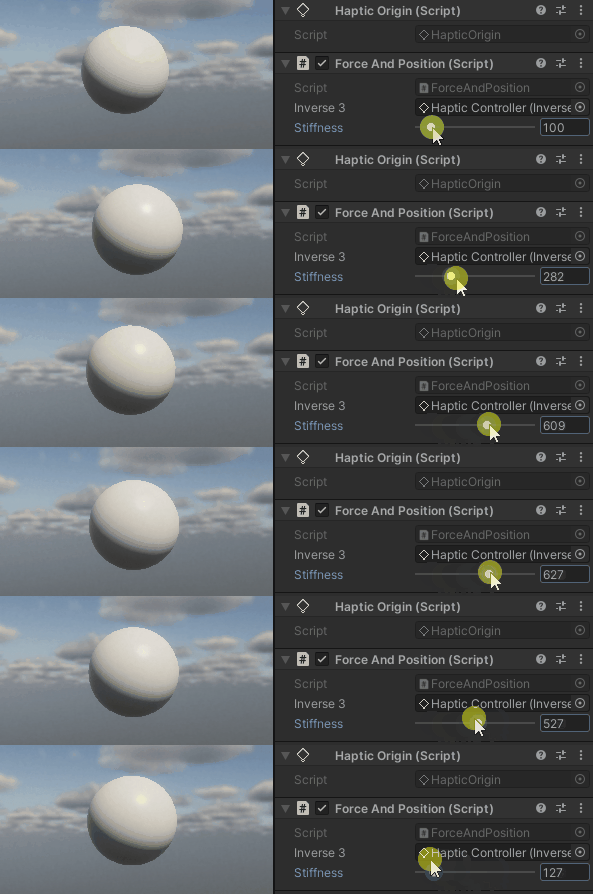
ソースファイル
この例で使用される最終的なシーンと関連ファイルはすべて、Unity のパッケージマネージャーにある Tutorials サンプルからインポートできます。
ForceAndPosition.cs
/*
 * Copyright 2024 Haply Robotics Inc. All rights reserved.
 */

using Haply.Inverse.DeviceControllers;
using Haply.Inverse.DeviceData;
using UnityEngine;

namespace Haply.Samples.Tutorials._1_ForceAndPosition
{
    /// <summary>
    /// Demonstrates the application of force to maintain the cursor at its center position.
    /// </summary>
    public class ForceAndPosition : MonoBehaviour
    {
        public Inverse3Controller inverse3;

        [Range(0, 400)]
        // Stiffness of the force feedback.
        public float stiffness = 100;

        private void Awake()
        {
            inverse3 ??= FindObjectOfType<Inverse3Controller>();
        }

        /// <summary>
        /// Subscribes to the DeviceStateChanged event when the component is enabled.
        /// </summary>
        protected void OnEnable()
        {
            inverse3.DeviceStateChanged += OnDeviceStateChanged;
        }

        /// <summary>
        /// Unsubscribes from the DeviceStateChanged event and reset the force when the component is disabled.
        /// </summary>
        protected void OnDisable()
        {
            inverse3.DeviceStateChanged -= OnDeviceStateChanged;
            inverse3.Release();
        }

        /// <summary>
        /// Event handler that calculates and send the force to the device when the cursor's position changes.
        /// </summary>
        /// <param name="sender">The Inverse3 data object.</param>
        /// <param name="args">The event arguments containing the device data.</param>
        private void OnDeviceStateChanged(object sender, Inverse3EventArgs args)
        {
            var inverse3 = args.DeviceController;

            // Calculate the force.
            var force = (inverse3.WorkspaceCenterLocalPosition - inverse3.CursorLocalPosition) * stiffness;

            // Apply the force to the cursor.
            inverse3.SetCursorLocalForce(force);
        }
    }
}